This is useful if you've having issues with a specific website or web application.
Google Chrome:
1. Press CTRL + SHIFT + DELETE on your keyboard all at the same time to bring up the Clear Browsing Data dialog:
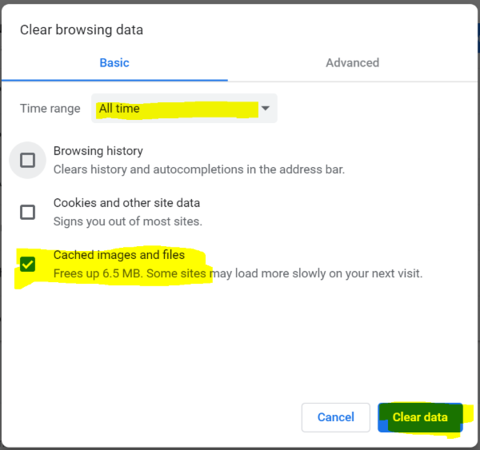
2. Choose "All time" in the drop-down list at the top for "Time range", and then check "Cached images and files" and ensure that all other checkboxes are unchecked, and then click [Clear data]
Mozilla Firefox:
1. Press CTRL + SHIFT + DELETE on your keyboard to bring up the Clear All History dialog:
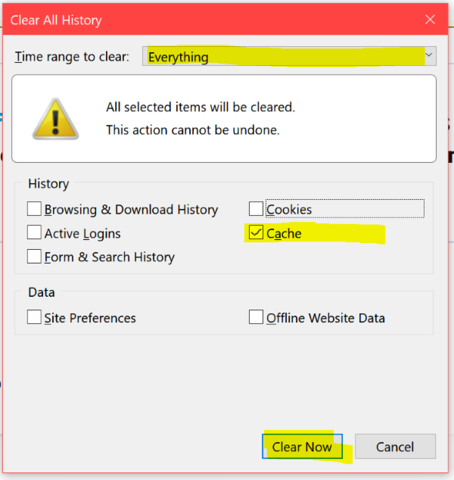
2. Select "Everything" in the drop-down list at the top for "Time range to Clear", then un-check all of the boxes except for "Cache", and click [Clear Now]
Microsoft Edge/Internet Explorer:
1. Press CTRL + SHIFT + DELETE all at the same time on your keyboard to bring up the Clear Browsing Data menu:
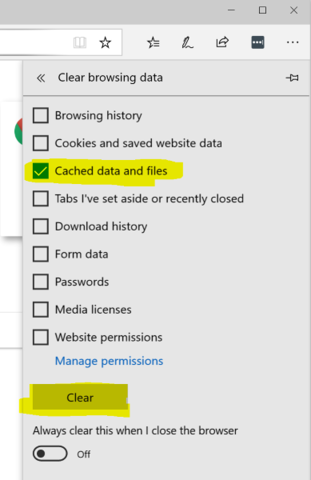
2. Ensure "Cached data and files" is checked, and uncheck everything else, and then click the [Clear] button
0 Comments